Still filtering spam primarily using the “From:” header? Then read this.
Posted: 1 October 2009 Filed under: system administration | Tags: spam, system administration Leave a commentI’m working with an organization that has been refusing “share this” e-mails from our Web site; specifically, e-mails that originate at our Web server that have that organization’s domain name in the “From:” header.
Here’s the problem with this. Let’s say that Joe Bloggs works at Bloggy Spot, and his e-mail address is “joe@bloggyspot.com.” His coworker Carl really wants to forward him a relevant article from the Time Magazine Web site, so he fills out the form, enters his e-mail address (which is required), and Joe’s, and hits “send.”
But since that message from Time Magazine does not originate from inside your network — as far as you can tell — and it claims to come from Joe’s coworker Carl (“carl@bloggyspot.com”), you refuse that message. “Sorry, can’t deliver to Joe,” you say. “There’s no way you could be Carl. Carl wouldn’t send e-mail from anywhere other than here.”
Don’t refuse those e-mails. Allow them. Rely on other, more reliable methods, and be happy.
Why shouldn’t you base your filtering on the From: header?
For two reasons.
First, you’re trying to fight against something that has been part of the nature of e-mail since its beginning, and second, you’re trying to fight against the nature of the Web today.
- This has been the nature of e-mail since its beginning.
The e-mail protocol standard has always allowed e-mail clients, and hence people, to put whatever they want in the “from” box — so from the beginning, conscientious system administrators have had to rely
on much more robust methods of content and spam filtering. Looking in the “From:” header for an e-mail supposedly sent from “bloggyspot.com,” and prohibiting e-mail that way, will only make it harder on users. Regarding the organization I’m negotiating with, their system administrator did point out that they already have multiple other layers of filtering and spam protection in place. I argued that since that was the case and since those methods are much more reliable, they should be relying on these instead.Perhaps you see the issue: a system that relied only on this level of filtering would be quite easy to defeat, and a system that relied on more filtering than this, wouldn’t need this type of quasi-effective filtering anyway.
- This is the nature of the Web today.
When you visit a Web site and forward an article to someone you know, your message in the vast majority of cases comes “from” your e-mail address. Obviously, this is done so that the recipient will be more
likely to accept the e-mail when it arrives. The Web’s most popular sites all follow this practice.The New York Times, Time Magazine, CNN, and Fox News sites, for example, allow — and in the case of the Times, require — a user to enter their own e-mail address as the “From:” address. Yahoo!, the Web’s third most visited site, does this as well. I’m sure there are many, many more examples.
Spam is a big problem for organizations, but when filtering spam, you’ve got to choose your battles carefully. If you hamstring your users too much, the costs probably won’t be worth the benefits.
“Let them eat tweets”
Posted: 23 April 2009 Filed under: Web 2.0 | Tags: Twitter 1 CommentI recently came upon a New York Times Magazine article by Virginia Heffernan regarding Twitter’s “claustrophobic” feel; an experience where the constant chatter of strangers’ tiniest doings finally becomes mindless noise. At the center of that experience is an emptiness: the realization that we are alone in many ways.
The meanness, the smallness, of our connections becomes apparent. A deeper connection is independent of our Facebook friends or Twitter followers. Were I to imitate Bruce Sterling, I might refer to this as “poverty.” Where is the richness in life that comes from deep, satisfying relationships with others?
Using Twistori to observe Twitter’s emotional zeitgeist, Heffernan writes,
The vibe of Twitter seems to have changed: a surprising number of people now seem to tweet about how much they want to be free from encumbrances like Twitter…
“I wish I didn’t have obligations,” someone posted not long ago. “I wish I had somewhere to go,” wrote another. “I wish things were different.” “I wish I grew up in the ’60s.” “I wish I didn’t feel the need to write pointless things here.” “I wish I could get out of this hellhole.”
The inner vibe hasn’t changed. No matter how much or how long we distract ourselves with it, interesting technology is an empty shell. As an end in itself, it will never, ever satisfy.
Use crawl-delay in your robots.txt file to slow down robots
Posted: 14 April 2009 Filed under: system administration | Tags: search, system administration Leave a commentYou can use the “Crawl-delay” tag in your robots.txt file to slow down Web crawlers:
User-agent: *

Crawl-delay: 15
The time is specified in seconds.
Resuming scp transfers using rsync
Posted: 20 August 2008 Filed under: ubuntu | Tags: command line, linux 3 CommentsWell, since you love that good ol’ command line, I’ll pass on to you something I found today out there on the Internets. scp (“secure copy”) is great, but it can’t resume a transfer that failed halfway in the middle.
What you can do instead, since you have rsync installed, is:
rsync --partial --progress --bwlimit=10 --rsh=ssh user@host:/remote/file/path /local/file/path
Works good!
Changing Office 2007’s default document format
Posted: 26 June 2008 Filed under: productivity | Tags: ODF, open standards 2 CommentsRecently at work we upgraded our office suite to Office 2007. By default, Office saves documents in a new proprietary format from Microsoft that is totally incompatible with previous versions of Microsoft Office. We deal with a number of people outside our organization who of course don’t have the kind of money to be forced to upgrade, so we simply changed our default file format to the previous .doc format.
Here are instructions on changing the default Word option; you’ll need to change it in PowerPoint and Excel in basically the same way.
- Open Microsoft Word 2007.
- Click the “Office Button” (found at the top left of your screen), and at the bottom of that list click “Word Options.”
- The “Word Options” window will open. Now click “Save” in the left panel.
- On the right-hand panel, change the top option which reads “save files in this format” from “Word Document (*.docx)” to “Word 97-2003 Document (*.doc).”
- Click “OK” and you’re done.
Screenshots:
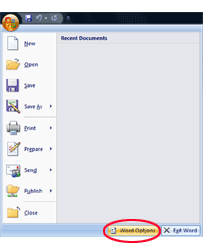
The options button in Word 2007.
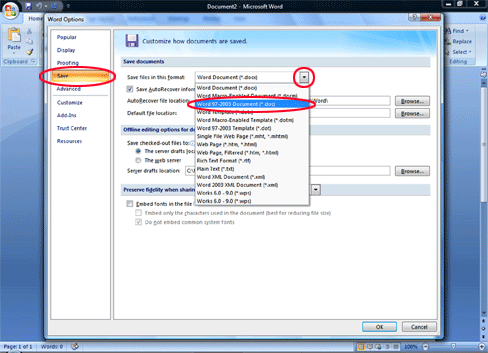
Setting the default file format in Word 2007.
You can also ask everybody else to download and install a converter for their Microsoft Office software, so they can open and read the documents you send them. But why not use the ISO-approved, vendor-neutral Open Document Format (ODF)?
Microsoft will be adding support for ODF soon to Microsoft Office anyway:
“ODF has clearly won,” said Stuart McKee, referring to Microsoft’s recent announcement that it would begin natively supporting ODF in Office next year and join the technical committee overseeing the next version of the format.
If you’re facing the choice to “lock” your data within a proprietary format, you should go into the decision with your eyes wide open. Know the reasons you’re placing your data into a format that you’re forbidden from modifying or extending. Be sure to look behind and through common buzzwords such as “open,” or the magic “XML.” Can you really get the data out of there? Or transform it however you please?
What is a widget?
Posted: 23 May 2008 Filed under: Web 2.0 Leave a commentI’ve been asked a number of times what a widget is, and my answers have changed as widgets have changed.
We’ve all heard the term used in manufacturing; you manufacture a “widget,” when you don’t really care what it is you’re manufacturing. It’s a “widget.” A thing.
Then it was repurposed for use in developer circles when referring to GUI development. A widget is one of a set of decorative and functional pieces for a user interface. For example,
- A scrollbar
- A button
- A dropdown list
Now it’s been repurposed again, and made weirder. Perhaps this is better than creating some meaningless neologism, though.
A Web “widget” is a bit of third-party code you can copy and paste into your page, thereby bringing some outside functionality into your site that you might not already have. They’re built with JavaScript or Flash and incorporate some interesting feature limited only by the imagination of the people who create them:
- Allow you to submit your credit card number to donate to a cause
- Browse an online catalog in a very small space
- Flip through a photo album
- Play or download music
- List news items from an RSS feed
- Edit a wiki or keep track of recent changes
- Share files
For example, Cory Doctorow writes a new fiction book titled Little Brother. He wants the widest possible audience for his work, and assumes that people will pay for certain versions. So he releases the content under a Creative Commons license, and has a widget created that allows people to listen to the audiobook.

They’ve been confused with “badges,” which display an affiliation but generally don’t do anything other than link to an external site.
 Emphatic Nonsense